
Perfect Uninstaller
6.3.4.1
Size: 2.5 GB
Downloads: 5398
Platform: Windows All

Nowadays, the number of programs is becoming bigger and bigger and it’s easy to get a lot of programs on your PC that you no longer need. You have to try them yourself in order to really find out their use. There are also a lot of programs that can cause errors and operating system problems, so it would be better to delete them as soon as possible. The problem is that a lot of software have inefficient uninstallers, so you may realize that, even if the programs appear to be deleted, there are still many left overs in the systems. These left overs can accumulate over time and may cause a series of problems. Fortunately, there is a program that can completely remove any piece of software, without leaving any traces behind. That software is Perfect Uninstaller.
The installation process is extremely simple and it is also fast to complete. It can run on every version of Windows and on older computers as well. The size of the program folder is around 14 MB, so the program can be installed without problems even on smaller hard disks.
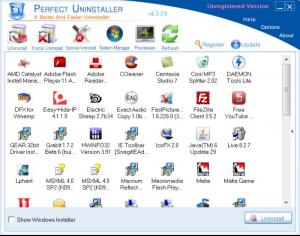
The interface is intuitive and can be successfully used even by beginners. It features graphical buttons for completing the program's tasks and it also displays all the installed applications as icons. When the user tries to uninstall a program using Perfect Uninstaller, the software automatically scans the registry and also the file system for leftovers, after deleting the program using its default uninstaller. This way, you can be sure that nothing will be left behind.
In case a program has a broken uninstaller, one can use the Force Uninstall option that removes that specific program completely from the system. The program's functionality doesn't only limit to uninstalling applications, but it can also backup the registry in case a wrong key gets deleted and can manage the startup items, allowing the user to remove the unwanted ones.
Processes can also be managed using Perfect Uninstaller. If a process looks malicious, it can be immediately stopped or uninstalled. Every process has its description and company displayed next to it.
Pros
It can successfully uninstall any application, even if its default uninstaller is broken or malfunctioning. It can also display all the running processes, enabling the user to stop or uninstall any desired one.

Cons
The trial version can display all the installed programs, but it cannot remove them. Perfect Uninstaller is the perfect software for completing removing application from the system, without leaving any traces behind.

Perfect Uninstaller
6.3.4.1
Download
Perfect Uninstaller Awards

Perfect Uninstaller Editor’s Review Rating
Perfect Uninstaller has been reviewed by Jerome Johnston on 01 Feb 2012. Based on the user interface, features and complexity, Findmysoft has rated Perfect Uninstaller 4 out of 5 stars, naming it Excellent







